Running Drupal in Docker

What is Docker?
In the simplest sentence, Docker allows to package software in an image that can run anywhere. Like virtual machines, Docker guarantees that the software that comes with the image will always run the same, regardless of the underlying environment.
Docker containers are instances of the image. With a virtual machine, system resource (RAM, disk space) are reserved and each vm is fully isolated. Docker containers have less isolation (share the filesystem) but are extremely fast (less than a sec) to fire up new ones. With Docker the size of the filesystem is not a limitation because the containers do not take up space like the vms do and theoritically you can run as many as you like in a single host machine.
The common practice with Docker is that each containers run a specific service. For example, for a simple LAMP stack, you would want a container for the apache and a container for mysql. This way, you can easily scale the service that you need and also maintain the container without worrying about dependencies.
There is a very quick tutorial on Docker that will get you started
Running Drupal in Docker for the first time
For my drupal test, I used those 2 mysql and drupal containers
Here is how I started mysql
docker run --name drupal-mysql -e MYSQL_ROOT_PASSWORD=root -e MYSQL_DATABASE=drupal -e MYSQL_USER=drupal -e MYSQL_PASSWORD=drupal -d mysql:5.5Here is what each part of the command mean:
run Starts the container
--name drupal-mysql Give this container the name drupal-mysql
-e MYSQL_ROOT_PASSWORD=root Pass environmental variables to the container. This one assigns the root password t root.
-d mysql:5.5 Uses the 5.5 tag of the mysql image
Here is how I started drupal
docker run --name drupal-test -p 8080:80 --link drupal-mysql:mysql -d drupal-p 8080:80 Maps the host’s 8080 port to the container’s 80 port --link drupal-mysql:mysql Link this container to the drupal-mysql container
Now run docker ps to see the running containers or docker ps -a to see all the containers
You can quickly get a login list of instances tha you do not need. IN this case , docker rm ID1 ID2… to remove them
Run docker images to see all your available images:
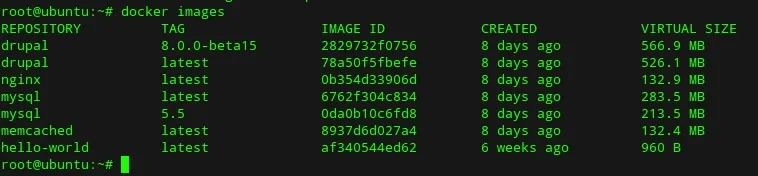
What we have now are 2 microservices running in the same host machine. Normally, to get drupal installed, we would need the internal IP of the mysql service. To get the IP try this:

But you do not really need the internal IP of the database. Docker takes care of creating a hosts entry in the drupal-test container. It uses the second part of the -link drupal-mysql:myssql as an alias. Here is the /etc/hosts file:
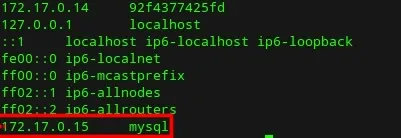
Now we are ready to install Drupal. Point the browser to the http://host_ip:8080 to start the drupal installation and use mysql as the database hostname
That’s it. I hope you enjoyed it.